Best Budget 3D Printer to Start Selling Prints (2026)
The best budget 3D printers for starting a print business in 2026, picked for reliability and cost per successful print, not just the lowest sticker price.
If you want to sell prints, the good news is that you do not need to spend much to start. The better news is that 2026's budget machines are genuinely good: auto-levelling, fast, and reliable enough to run a small shop from. The trap is assuming "budget" means "cheapest sticker price." For a business, the number that matters is not what the printer costs to buy, it is what it costs you per successful print.
A 169 machine that fails one print in five, needs constant fiddling, and ties up your evenings is more expensive than a 399 machine that just works, once you count the wasted filament, the late orders, and your own time. This guide picks the best budget printers to start selling from, with that lens.
What actually matters when you print to sell
A hobby buyer optimises for price and tinkering. A seller should optimise for these instead:
- Reliability and auto-calibration. Every failed print is filament, power and time you cannot bill. A machine that auto-levels, sets its own Z-offset and "just works" protects your margin. This is the single most important factor.
- Speed and throughput. Faster prints mean more orders fulfilled per day. Input shaping and Klipper-class firmware have pushed even cheap machines past 250 mm/s.
- Multi-colour, if your products use it. A four-spool system like Bambu's AMS Lite unlocks whole product categories (multi-colour toys, signs, keychains) without manual swaps.
- Build volume matched to your products. Selling jewelry and miniatures? A small bed is fine. Selling helmets and big decor? You need the room.
- Material range. Open-frame machines handle PLA, PETG and TPU well. For ABS, ASA or carbon-fibre filled materials you want an enclosure and a hardened nozzle.
- Failure detection. An AI camera that catches a failed print at 2 a.m. saves a whole spool and a whole night.
- Ecosystem and support. Good slicer profiles, spare parts and a real support channel keep you printing instead of troubleshooting.
The picks for 2026
Prices below are approximate USD as of mid-2026. Budget printers go on sale constantly, so watch for deals, and check EU pricing if you are printing in Europe.
Best overall to start: Bambu Lab A1
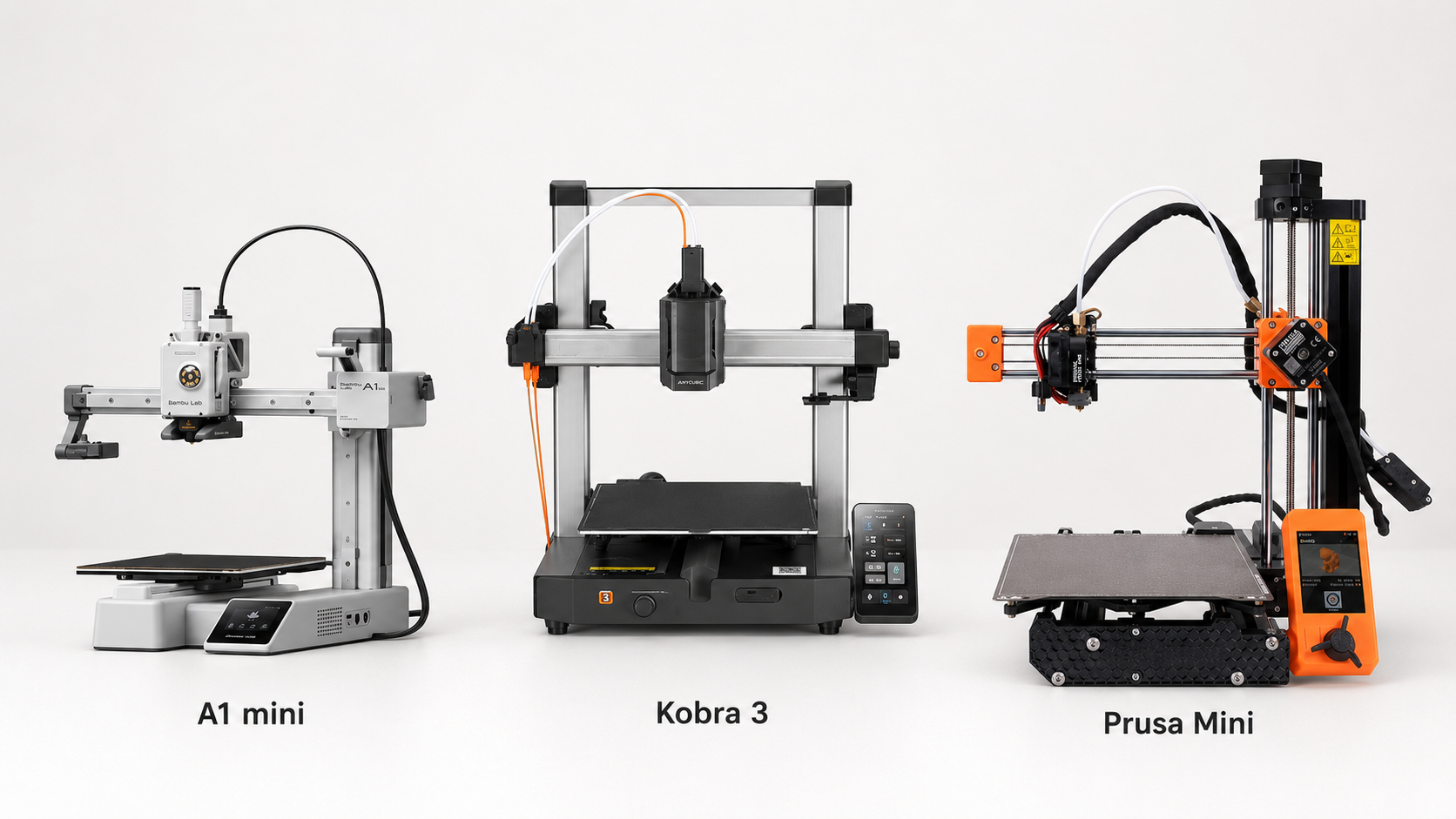
For most new sellers this is the machine. The A1 is fast, near-foolproof to set up, and reliable enough that you spend your time designing and shipping rather than fixing. The Combo with the AMS Lite (around 399, often discounted to 279 to 349 on sale) adds automatic four-colour printing, which opens up a big chunk of the most profitable Etsy categories. Its total cost of ownership is genuinely lower than many cheaper machines because it wastes so little. Bambu recently overtook Creality as the top-selling budget brand, and this is a big reason why.
Best for: a first business printer that covers PLA, PETG and TPU, with multi-colour on tap.
Best for small, detailed items: Bambu Lab A1 Mini
Same set-and-forget experience in a smaller, cheaper package (roughly 199 to 349 depending on Combo and sales). The smaller bed is no drawback if you sell jewelry, miniatures, keychains and other small goods, and it is arguably the most beginner-friendly printer ever made. A superb low-risk way to test selling before scaling.
Best for: jewelry, miniatures, small toys, and anyone starting on the tightest budget.
Best for functional and engineering parts: Elegoo Centauri Carbon
The most affordable enclosed CoreXY machine right now (around 299 to 349). The enclosure and hardened setup let it handle ABS, ASA and carbon-fibre materials that open-frame machines struggle with, and it is genuinely fast (up to 500 mm/s). If your niche is functional parts, outdoor items or replacement parts rather than decorative ones, this is the value pick.
Best for: functional, outdoor and engineering products that need tougher materials. See our filament guide for which material suits which job.
Best multi-colour alternative: Anycubic Kobra 3 Combo
A strong multi-colour option on a tighter budget (around 299 to 399 with the colour system), with a broad print area and fast speeds. A good all-rounder if you want colour capability and a bit more bed than the A1 Mini without stepping up in price.
Best for: multi-colour products where you want more build area for less money.
Best rock-bottom entry: Creality Ender 3 V3 SE / V3 KE
If your budget is truly tight, the Ender 3 V3 SE (around 169 to 200) is the cheapest sensible starting point, with auto-levelling and decent quality, though it is slower and more hands-on than the Bambu machines. The V3 KE (around 265 to 279) adds Klipper and real speed, and both are open and very moddable. Be honest with yourself: these reward tinkering, so they suit sellers who enjoy the machine as much as the products.
Best for: the lowest possible entry price, and makers who like to tune and mod.
Best EU-made, set-and-forget: Prusa MINI+
If you are in Europe and value local support, open-source repairability and long-term upgradeability, the Prusa MINI+ is a dependable small machine that runs the excellent PrusaSlicer ecosystem. It costs more than a comparable Bambu, but the reliability, documentation and EU availability are part of what you pay for. Our Prusa lineup guide covers where it sits in the range and what to step up to later.
Best for: European sellers who want reliability, support and an upgrade path.
Worth stretching for: Bambu Lab P1S
At roughly 599 to 699 this sits at the top of "budget," but it is arguably the best value of the lot if you can stretch. The fully enclosed CoreXY chamber handles demanding materials, the AMS adds multi-colour, and 500 mm/s speed plus an enclosure means you can sell both decorative and functional parts from one quiet, reliable machine. If you already know you are serious, buying here once can beat buying twice.
Best for: sellers who want one machine to do almost everything and plan to run it hard.
A note on resin
If your whole plan is ultra-detailed miniatures or fine jewelry, a budget resin printer (such as an Elegoo Mars or Anycubic Photon class machine, often under 300) gives detail that FDM cannot match. The trade-off is real: resin is messy, needs washing and curing, demands ventilation and gloves, and is slower to produce finished, sellable pieces. For most starting sellers, FDM is the easier path; add resin later if your niche specifically demands that level of detail.
Match the printer to what you sell
The right printer depends on your products as much as your budget:
- Jewelry, miniatures, small toys: A1 Mini, or a budget resin printer for maximum detail.
- Multi-colour toys, signs, keychains: A1 Combo or Kobra 3 Combo for the colour system.
- Functional, outdoor or replacement parts: Elegoo Centauri Carbon or P1S for the enclosure and tougher materials.
- Large decor and props: step up to a full-size bed; the small machines will limit you.
If you have not settled on what to make yet, our guide to what sells on Etsy walks through the most profitable niches and product ideas.
The cost a cheap printer hides
Here is the part new sellers miss. A budget printer lowers your up-front cost, but it does not make your prints free to produce. Every print still costs you filament, electricity, wear on the machine, and your own time slicing, monitoring, post-processing and packing, plus the share of failed prints that never reach a customer. Those costs go into every quote whether you track them or not.
So do not let a cheap printer trick you into cheap pricing. The machine choice and the pricing are two halves of the same decision: a reliable printer keeps your failure rate and wear costs low, and honest pricing makes sure each sale actually pays. Our guide on how to price 3D prints gives you the full formula with a worked example, so the margins these products are capable of become real money.
Where to start
For most people the answer is simple: a Bambu Lab A1 Mini if you are testing the water with small items, the A1 Combo if you want colour and room to grow, and the Elegoo Centauri Carbon if your niche needs tougher materials. Buy reliable, keep your filament dry, track your real failure rate, and price from true costs. The printer is the easy part. The discipline around it is what turns a hobby into a shop.